Architecture
BMDynIP keeps managed GoDaddy DNS hostnames pointed at your server’s current public IPv4 address. The DNS updater and web interface run on a Linux server behind your router, with MariaDB storing managed hostnames, live status, and DNS change history.
System overview
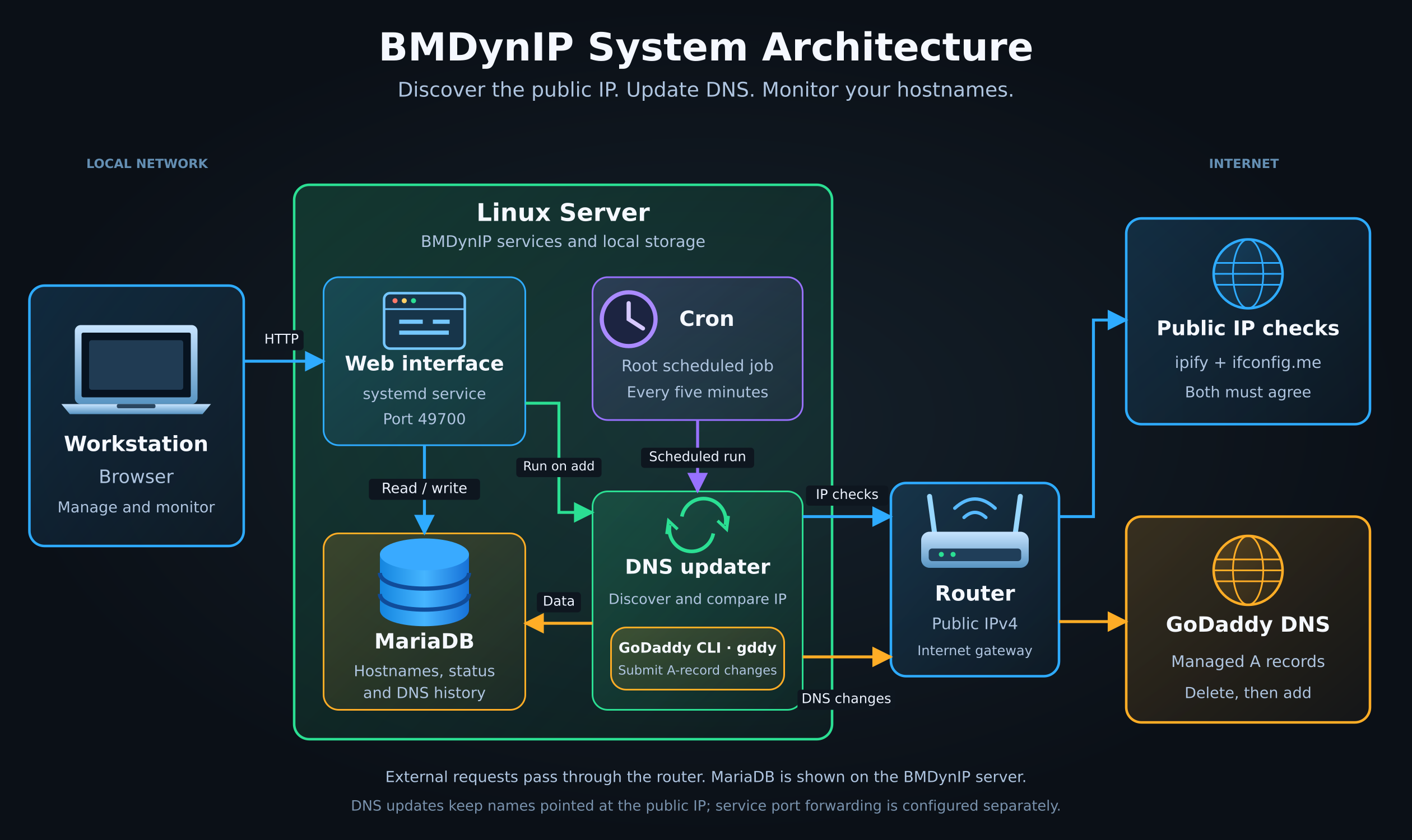
The diagram shows a deployment with MariaDB on the BMDynIP server. External requests pass through the router using its public IPv4 address.
Components
| Component | Responsibility |
|---|---|
| Workstation and browser | Open the Web UI to manage hostnames, change the runner schedule, and inspect status and history. |
| Web UI | Runs as bmdynip-web.service on port 49700. Reads status and history from MariaDB, saves hostname changes, and controls the installed cron schedule. Adding a hostname starts the updater immediately. |
| Cron | Starts the updater as root every five minutes by default. Scheduled runs continue independently of the Web UI service. |
| DNS updater | Discovers the public IPv4 address, reads managed hostnames from MariaDB, and submits DNS changes when the IP or hostname list changes. A file lock prevents overlapping runs. |
| MariaDB | Stores managed hostnames, live status, and DNS change history. |
GoDaddy CLI (gddy) |
Uses root’s configured authentication to submit A-record changes to GoDaddy. |
| Router | Connects the local network to the Internet. Its public IPv4 address is the address BMDynIP discovers and submits to DNS. |
| ipify and ifconfig.me | Independently report the public IPv4 address. Both must return the same valid address before DNS changes are submitted. |
| GoDaddy DNS | Holds the managed A records that point hostnames to the public IPv4 address. |
How an update works
- Cron starts the updater, or the Web UI starts it after a hostname is added.
- The updater queries ipify and ifconfig.me. Failed requests, invalid responses, or disagreement prevent DNS changes.
- The updater reads the managed hostnames from MariaDB and compares the public IP and hostname list with its saved state.
- When an update is needed, it launches detached
gddycommands. For each hostname, the command deletes all A records at that name, then creates one with the submitted address if deletion succeeds. - After launching all commands, the updater saves the submitted IP and
hostname list in
/opt/prod/bmdynip/data/state.json. It does not wait for the detached commands to finish or parse their output.
With no managed hostnames, the updater still records the observed public IPv4 address and makes no DNS changes.
The saved state records what was submitted. It does not confirm that GoDaddy applied the changes. The Web UI separately checks each hostname through the server’s DNS resolver on page load and every five seconds. DNS caching can delay visible changes.
DNS and access to hosted services
BMDynIP updates DNS records. To make a service behind the router reachable from the Internet, configure the required router port forwarding separately.
The Web UI has no authentication. The workstation in the diagram accesses it
over the local network; exposing port 49700 would also expose its management
controls.
See Configuration for hostname and record behaviour, Web interface for management controls, and Running and monitoring for logs and retry procedures.